
Visual Studio Remote Development
Machine-translated (anthropic, claude-haiku-5-5) from the Chinese original. Read the original in 中文
Contents
Preface
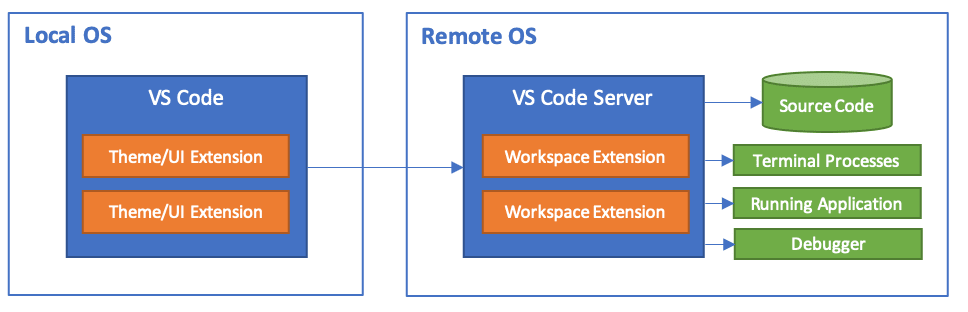
Recently I built a remote development project Visual Studio Code Remote Development. It moves the VS Code client to the cloud,
letting you use a fully featured development environment inside containers, on remote devices, or even on the Linux subsystem for Windows (WSL).
Official description
Develop on the same operating system you deploy to, or use bigger or more specialized hardware.
Sandbox the development environment so it does not affect the configuration of your local machine.
Make it easy for new contributors to get started, and keep everyone on a consistent environment.
Use tools or runtimes that are unavailable on your local operating system, or manage multiple versions of them.
Develop Linux-deployed applications using the Windows Subsystem for Linux.
Access an existing development environment from multiple machines or locations.
Debug applications running in other locations, such as a customer site or the cloud.
How to install
System requirements
Local: a supported OpenSSH-compatible SSH client must also be installed.
Remote SSH host: an SSH server running on:
x86_64 Debian 8 and later, Ubuntu 16.04 and later, CentOS / RHEL 7 and later.
ARMv7l (AArch32) Raspbian Stretch / 9+ (32-bit).
ARMv8l (AArch64) Ubuntu 18.04+ (64-bit).
Experimental SSH host support (VS Code Insiders only):
Windows 10 / Server 2016/2019 (1803+), using the official OpenSSH Server and enabling remote.SSH.useLocalServer in VS Code settings.
Ubuntu 18.04
First, download the package from GitHub download link
wget https://github.com/cdr/code-server/releases/download/2.1698/code-server2.1698-vsc1.41.1-linux-x86_64.tar.gz
tar xvzf code-server2.1698-vsc1.41.1-linux-x86_64.tar.gz
cd code-server2.1698-vsc1.41.1-linux-x86_64
# 设置密码
export PASSWORD=password
./code-server --auth password
Process daemon
sudo nano /etc/systemd/system/code-server.serviceAdd the following configuration:
[Unit]
Description=Code Server IDE
After=network.target
[Service]
Type=simple
User=root
Restart=on-failure
RestartSec=10

Environment="PASSWORD=password"

ExecStart=/path/to/code-server --auth password

StandardOutput=file:/var/log/code-server-output.log
StandardError=file:/var/log/code-server-error.log
[Install]
WantedBy=multi-user.target
Start the service
systemctl start code-server
Comments