
Hands-on Notes on AWS Services and a Kafka Cluster
Translated from the Chinese original. Read the original in 中文
Contents
Introduction
A recent project of mine needed AWS services. Since this was my first time getting hands-on with AWS and its services, I thought it worth writing a post to record the technologies I came across, some of my understanding and takeaways, and a few real operations, so that I can look back and reuse some of the commands.
The project involved
- Amazon MSK, i.e. Fully Managed Apache Kafka — put simply, a Kafka cluster
- Amazon IoT Core, something similar to an MQTT broker
- Amazon Lambda, a serverless platform that supports many programming languages
- Amazon S3, Scalable Storage in the Cloud
- Amazon IAM for access control
- Amazon CloudWatch - a platform similar to Grafana
This journal walks through the services above and chains them all into one data flow
Walkthrough
Business flow
We start where the data enters and follow it step by step, tying together every service it passes through.
IoT Core is the entry point: it accepts data from IoT devices or other services that speak MQTT, and uses the Rules feature of Message routing to forward it to a Kafka topic, or to send it to Lambda, which processes it and writes it into JSON files on S3.
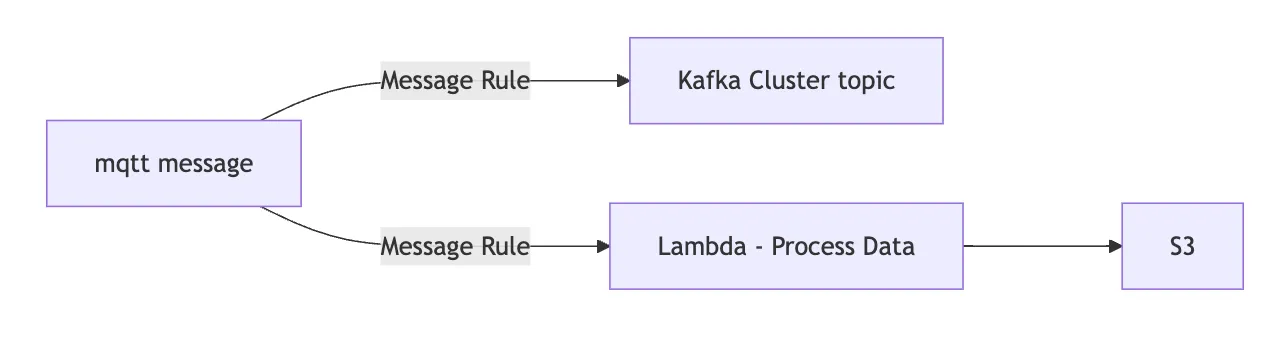
graph LR
A[mqtt message]-- Message Rule --->B[Kafka Cluster topic]
A-- Message Rule --->C[Lambda - Process Data] ---> D[S3]
IAM access control
When IoT Core runs into an error, it writes the log to CloudWatch. To make all of this work, you first configure Policies for several services and assign them to various Roles; the services then use the permissions a Role grants to operate on other AWS services. In short, a Policy is a set of individual permissions — s3:ListBucket, for example, is one of the permissions in a Policy.
A Role, in turn, is a set of one or more Policies: an S3 Admin Policy and a CloudWatch Write Policy, for example, become the Policies of a Role. Only when a Role with the right permissions is assigned to an instance of an AWS service can that instance operate on and access resources — a key prerequisite.
MSK configuration
MSK comes in two types, Provisioned and Serverless, and Serverless supports no authentication method other than IAM. So if you want IoT Core to work with MSK, you must use the provisioned version, because IoT Core rules only support SASL/SCRAM or SSL authentication.
There are several ways to reach the nodes of the MSK cluster from outside to create topics. I used an EC2 client machine — a virtual machine acting as a jump host — and ran a proxy on it, so that from outside I could connect through the proxy to nodes inside Amazon on the same VPC network as the EC2 instance. One very important point: do not overlook whether the MSK and EC2 firewall rules let the traffic through; if they do not, you cannot connect. I spent a long time troubleshooting here before finding out it was the firewall
For how to set up the jump host, see the official documentation https://docs.aws.amazon.com/msk/latest/developerguide/create-client-machine.html
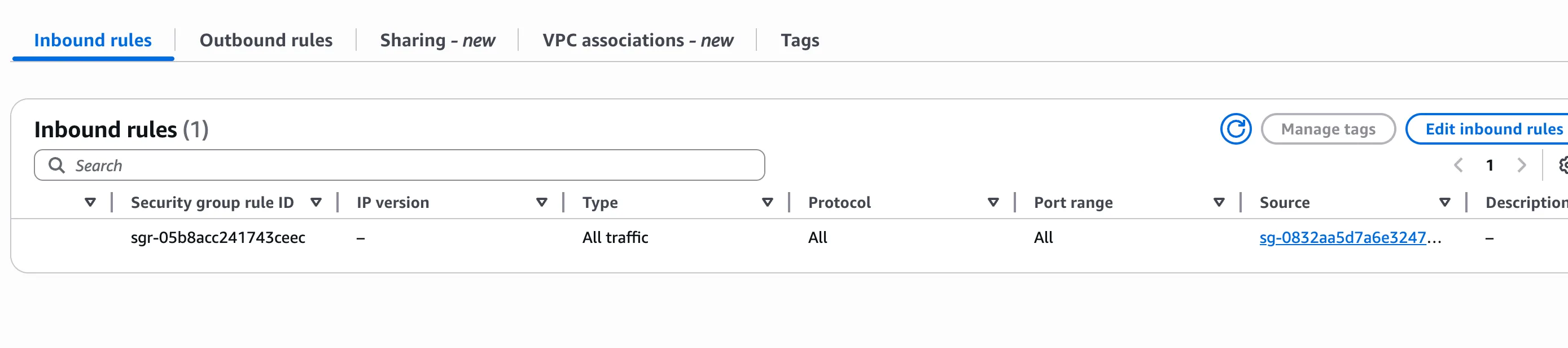
With access covered, let us go deeper into connections and permissions. First make sure the IAM Role of the EC2 instance may access the nodes and topics of the MSK cluster; then, on the jump host, the following commands create a topic, subscribe to it and send messages to it
# subscribe topic
./kafka-console-consumer.sh \
  --bootstrap-server url:port,url2:port \
  --topic topic \
  --consumer.config client.properties

# push data to topic, producer
./kafka-console-producer.sh \
  --bootstrap-server url:port,url2:port \
  --topic topic \
  --producer.config client.properties

# check all the topic
./kafka-topics.sh --list \
  --bootstrap-server url:port,url2:port \
  --consumer.config sasl.properties

# create a topic
./kafka-topics.sh --create \
  --bootstrap-server url:port,url2:port \
  --topic topic \
  --partitions 6 \
  --replication-factor 2 \
 --command-config sasl.properties
If you see something like Error while executing topic command : The AdminClient thread has exited. Call: createTopics, it is almost certainly a permissions problem: first check that your IAM and SASL/SCRAM/SSL settings are correct. For IAM on EC2, as long as the IAM role is configured correctly in the console, that IP can connect directly with IAM.
[ec2-user@ bin]$ ./kafka-topics.sh --create --bootstrap-server url:port --topic your_topic --partitions 6 --replication-factor 2
WARNING: Due to limitations in metric names, topics with a period ('.') or underscore ('') could collide. To avoid issues it is best to use either, but not both.
Error while executing topic command : The AdminClient thread has exited. Call: createTopics
[2025-06-11 05:00:49,875] ERROR org.apache.kafka.common.errors.TimeoutException: The AdminClient thread has exited. Call: createTopics
 (org.apache.kafka.tools.TopicCommand)
[2025-06-11 05:00:49,890] ERROR Uncaught exception in thread 'kafka-admin-client-thread | adminclient-1': (org.apache.kafka.common.utils.KafkaThread)
java.lang.OutOfMemoryError: Java heap space
        at java.base/java.nio.HeapByteBuffer.<init>(HeapByteBuffer.java:61)
        at java.base/java.nio.ByteBuffer.allocate(ByteBuffer.java:348)
        at org.apache.kafka.common.memory.MemoryPool$1.tryAllocate(MemoryPool.java:30)
        at org.apache.kafka.common.network.NetworkReceive.readFrom(NetworkReceive.java:103)
        at org.apache.kafka.common.network.KafkaChannel.receive(KafkaChannel.java:462)
        at org.apache.kafka.common.network.KafkaChannel.read(KafkaChannel.java:412)
        at org.apache.kafka.common.network.Selector.attemptRead(Selector.java:694)
        at org.apache.kafka.common.network.Selector.pollSelectionKeys(Selector.java:596)
        at org.apache.kafka.common.network.Selector.poll(Selector.java:501)
        at org.apache.kafka.clients.NetworkClient.poll(NetworkClient.java:596)
        at org.apache.kafka.clients.admin.KafkaAdminClient$AdminClientRunnable.processRequests(KafkaAdminClient.java:1542)
        at org.apache.kafka.clients.admin.KafkaAdminClient$AdminClientRunnable.run(KafkaAdminClient.java:1473)
        at java.base/java.lang.Thread.run(Thread.java:829)
IoT Core setup
Open AWS IoT - Message routing - Rules to add a new rule. Here I record how I used a Rule to forward data to Kafka. First choose Kafka as the Rule action and add a VPC under Destination, which again needs a matching IAM Role. Then set the Kafka topic to the topic you created earlier. For the Key I entered ${clientid()}, mainly so that Kafka can partition the data; if one key carries too much, a single partition may end up with too much content and become skewed.
Pay special attention to the SASL Configuration: the username and password must first be stored as a key-value pair in AWS Secrets Manager and bound to a key generated in Key Management Service (KMS). Later, when you connect with SASL/SCRAM, the key-value pair set here is your username and password
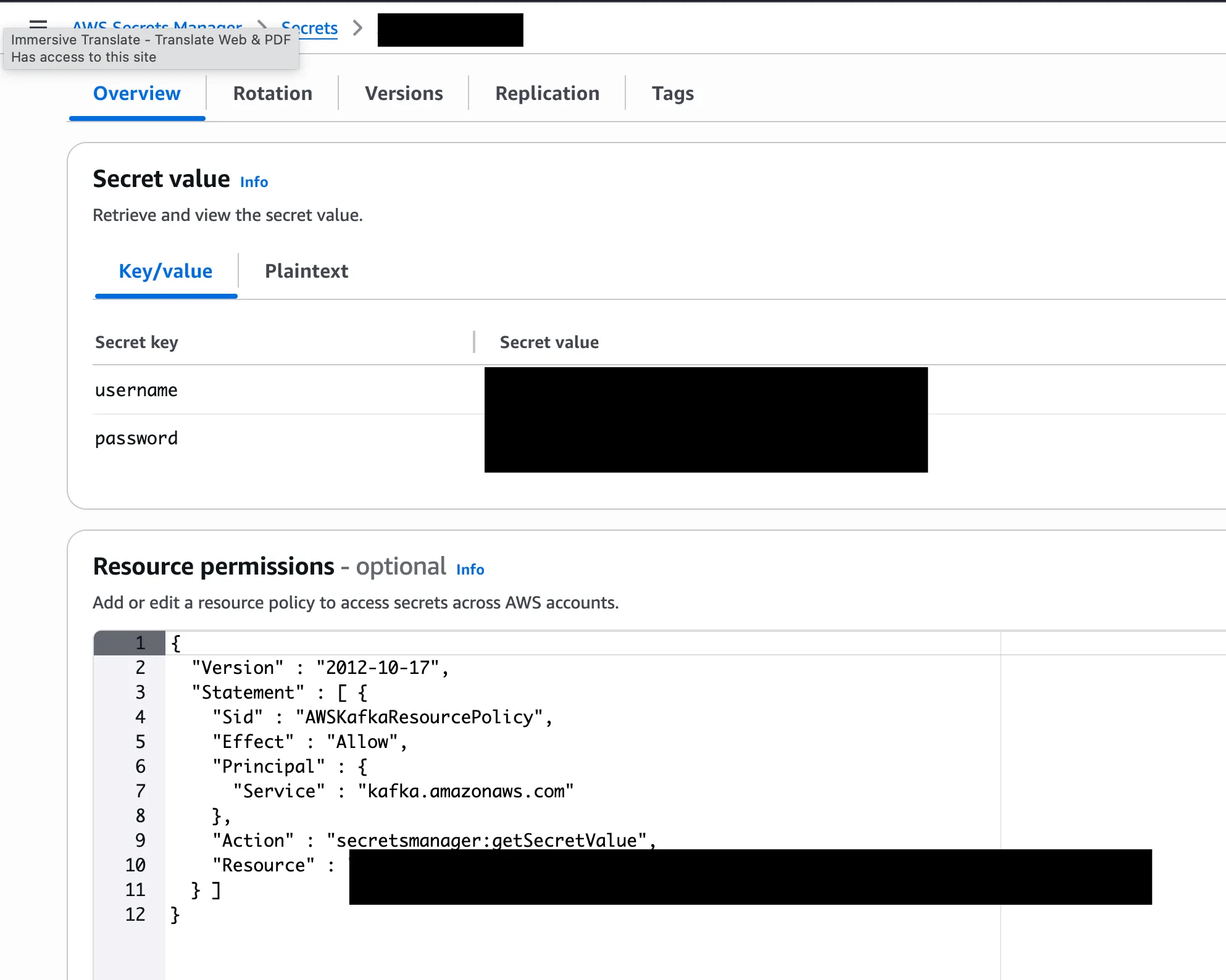
Then we use the following to read the value stored in Secrets Manager. This one is the username; for the password, simply replace username
${get_secret('AmazonMSK_iot', 'SecretString', 'username', 'you role arn')}
You can of course set some headers to make messages easier to identify, but too many may slightly affect performance
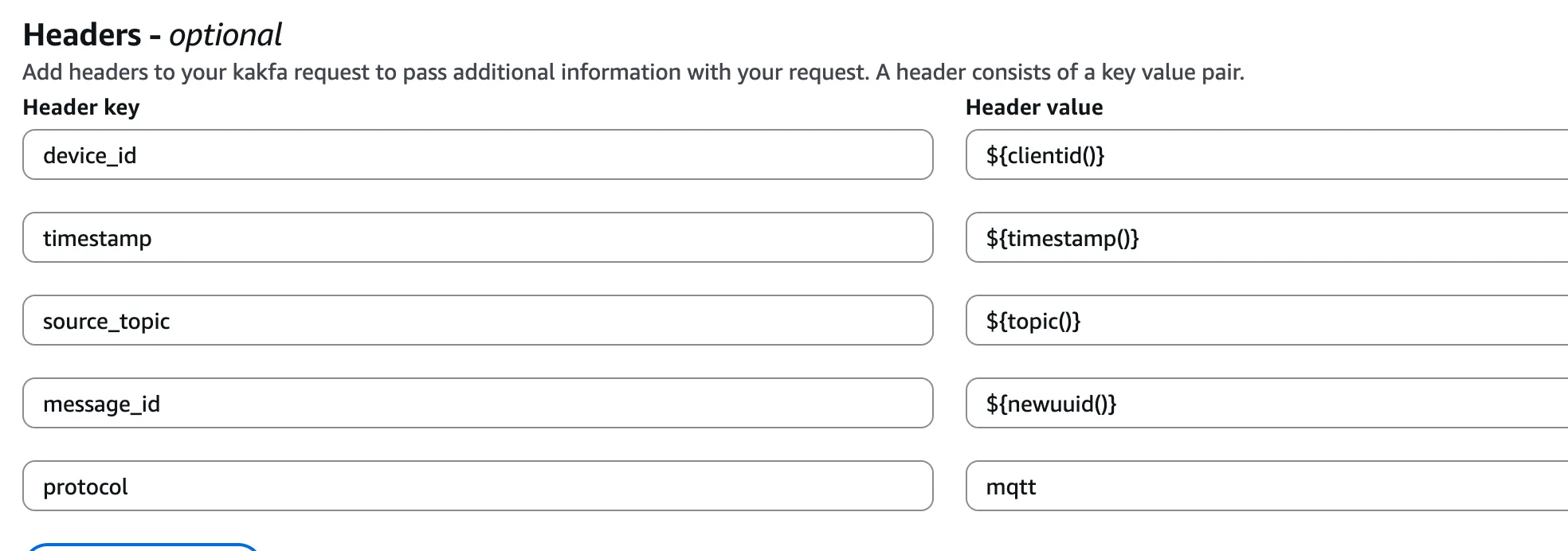
Lambda setup
Just add a Function in Lambda, then give the IoT Core rule an action pointing to that function, and the IoT data is sent there too. In the function I merge the MQTT data it receives and upload it to S3. If the IoT Core rule forwarded the data straight to S3, it would create one file per message, which is inconvenient to manage and inspect — that is why Lambda does the forwarding here.
However, since Lambda uploads the data to S3 directly without any buffering, a large volume of data might cause problems
Conclusion
That is every AWS service I have picked up recently. If anything new comes along, I will add it later
Comments